
Rendering Item Path: /sitecore/layout/Renderings/Methodist/Components/Locations/ImagingAvailability
Status: Active
Description: Schedule list by location with list or map view, one week listing for available slots, ability to toggle to show weekend times and sort by zip code, first available or future dates.
Component Specifications
- View Mode Field Type: Dropdown
Selection Options: Both views, List view, Map view - Default View Field Type: Dropdown
Selection Options: List view, Map view - Map Zoom Field Type: Dropdown
Selection Options: 8, 9, 10, 11, 12, 13, 14, 15, 16, 17, 18 - Search Radius Field Type: Single line text
- Sort Field Type: Dropdown
Selection Options: Alphabetical, First Available - Configurations Field Type: Multiple Checkboxes
Selection Options: Include Show Weekends Toggle, Show Weekends Enabled - Max Days of Availability Field Type: Single line text
SDCAvailability
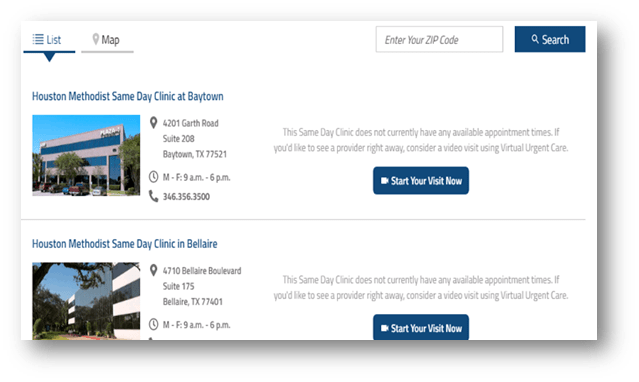
Rendering Item Path: /sitecore/layout/Renderings/Methodist/Components/Locations/SDCAvailability
Status: Active
Description: Same-day location virtual or in-person visit with location/map tabs, start visit now link. Search by zip code and view map or list of locations.
Component Specifications
- View Mode Field Type: Dropdown
Selection Options: Both views, List view, Map view - Default View Field Type: Dropdown
Selection Options: List view, Map view - Map Zoom Field Type: Dropdown
Selection Options: 8, 9, 10, 11, 12, 13, 14, 15, 16, 17, 18 - Search Radius Field Type: Single line text
- Timeslots Layout Field Type: Dropdown
Selection Options: Horizontal, Vertical